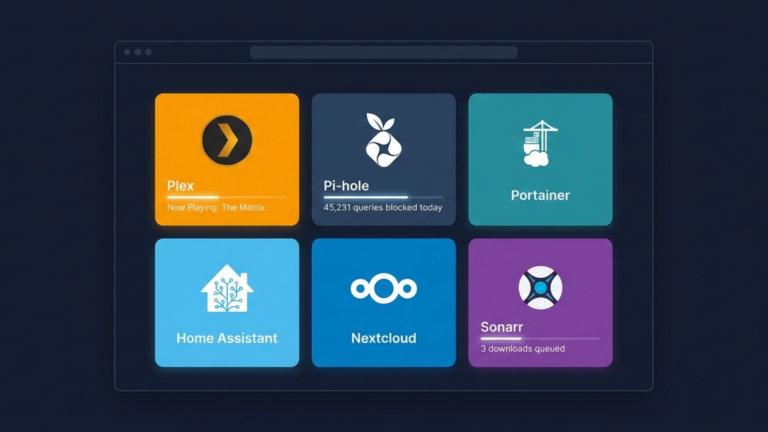
Your homelab has grown. What started as a single Raspberry Pi running Pi-hole is now a collection of servers hosting Plex, Nextcloud, Home Assistant, Portainer, and a dozen other services. Remembering IP addresses and port numbers becomes a full-time job. Your browser bookmarks are a mess of text links with no context, no visuals, and no indication of whether anything is actually running.
You need a command center.
Heimdall is the answer. Named after the Norse god who guards the Bifrost bridge, Heimdall is a free, open-source dashboard that gives you one-page access to every service in your homelab. Here’s what it actually is and why your homelab needs one.
The One-Paragraph Answer
Heimdall is a self-hosted dashboard application that runs as a Docker container and consolidates all your web applications and services into a single, customizable page. Instead of maintaining a graveyard of browser bookmarks or memorizing which service lives on which port, you get a clean visual interface that puts every service one click away. It is lightweight, requires almost no configuration, and looks good doing it.
The Problem It Solves
Homelab services rarely run on standard ports. Plex is 32400. Portainer is 9000. Home Assistant is 8123. Heimdall is typically 80. Keeping track of which service lives at which address on which machine is the kind of low-level friction that accumulates quietly until accessing your own infrastructure feels like a chore.
Browser bookmarks are the obvious solution, but they are text lists. No icons, no status, no visual organization. Scanning through dozens of bookmarks to find the right service takes longer than it should, and it only gets worse as your homelab grows.
Heimdall solves this by replacing both the mental overhead and the bookmark clutter with a single visual dashboard. Every service gets a tile. Every tile gets an icon. Everything is one click away from wherever you are on your network.
The Three Types of Applications
This is where Heimdall becomes genuinely interesting, because not all tiles are equal.
The first type is a Generic App, a simple shortcut. You provide a name, a URL, and an icon, and Heimdall creates a tile that opens that address. Basic, but effective for any service Heimdall doesn’t already know about.
The second type is a Foundation App. Heimdall maintains a library of popular self-hosted applications that it already recognizes. When you start typing the name of a known app, Heimdall auto-fills the icon and relevant metadata. You just add the URL, and you’re done.
The third type is an Enhanced App, and this is where Heimdall separates itself from a simple bookmark manager. For supported applications, Heimdall connects directly to that app’s API and pulls live data into the tile itself. Your Pi-hole tile displays how many queries it has blocked today. Your Plex tile shows what’s currently playing. Your Sonarr tile shows the download queue. Your dashboard stops being a launcher and becomes a live view of your entire homelab at a glance.
Why It Matters for a Homelab
The difference between a homelab that feels manageable and one that feels chaotic often comes down to visibility. When you have to SSH into a server or dig through bookmarks every time you want to check on a service, you check on services less often. Things break and sit broken longer than they should because the friction of monitoring them is just high enough to discourage it.
Heimdall removes that friction entirely. Opening a browser tab gives you an immediate view of everything running, what’s active, what’s serving, and what’s queued. The enhanced app tiles mean you get meaningful status information without navigating into each service individually. A single glance tells you more than a minute of tab-switching used to.
There is also something to be said for the aesthetic side of it. A homelab should be enjoyable to use. Heimdall’s clean interface, customizable backgrounds, and visual tiles make accessing your infrastructure genuinely pleasant rather than purely functional. That matters more than it sounds when you are spending your own time building and maintaining something for yourself.
The Takeaway
Heimdall is a self-hosted dashboard that turns a scattered collection of IP addresses and port numbers into a single, organized, visual command center. Its three application types, Generic, Foundation, and Enhanced, mean it works for any service, and works especially well for the services that matter most by surfacing live data directly on the tile. It is the bridge between you and everything running in your homelab. Once it is in place, you will not remember how you managed without it.









