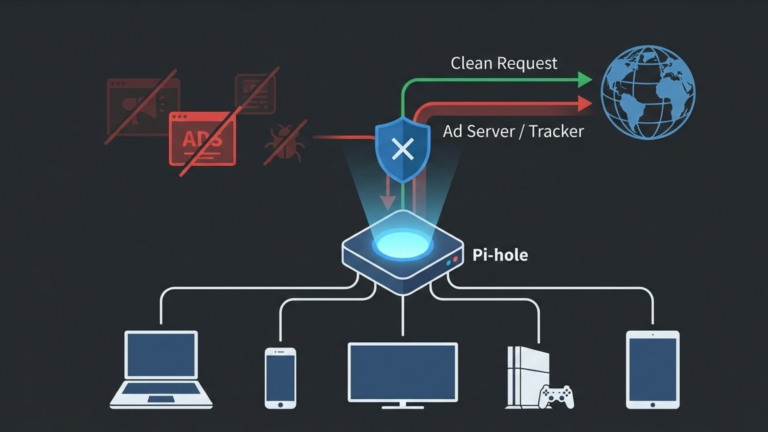
Ads are everywhere. On your phone, your laptop, even your smart TV. You can install a browser extension on your computer, but what about your roommate’s PlayStation? What about your fridge? Most devices don’t support ad blockers. But you can block ads for every device on your network without installing a single app on any of them. That’s what Pi-hole does. It’s a network-wide ad blocker that protects your entire home from ads, trackers, and malware domains at the source before they ever reach your screen.
The One-Paragraph Answer
Pi-hole is a free, open-source DNS sinkhole that blocks unwanted content at the network level. Instead of installing ad blockers on every phone, laptop, and smart TV in your house, you set up Pi-hole once. It acts as your network’s DNS server, intercepting every domain request from every device. When a device asks for an ad domain, Pi-hole responds with a black hole, sending the request nowhere. The ad never loads. The tracker never phones home. And every device on your network benefits automatically, with zero configuration on each device.
How Ads Actually Get on Your Screen
To understand Pi-hole, you first need to understand how ads arrive on your screen in the first place.
When you visit a website, your browser doesn’t just load content from that one domain. Modern web pages are patchworks of content pulled from dozens of different servers. Your browser loads the main page, then that page instructs your browser to also load content from ad servers, tracking networks, and analytics platforms, each one a separate domain requiring its own connection. Those secondary domains are where the real problem lives. They track you across sites, serve intrusive ads, slow down your browsing, and in some cases distribute malware.
Every domain your browser needs to connect to requires a DNS lookup first. DNS is the Internet’s address book. It translates human-readable domain names like ad-server.com into the IP addresses computers actually use to connect. Before your browser can load an ad, it has to ask a DNS server where that ad server lives.
Pi-hole sits at exactly that moment. It intercepts the question before it ever reaches the public internet.
How Pi-hole Works
Pi-hole operates as your network’s DNS server. Instead of your devices sending DNS queries to your internet provider or Google, they send them to Pi-hole first.
When a device on your network asks where a domain lives, Pi-hole checks that domain against its blocklists, large, regularly updated collections of known ad servers, tracking networks, and malware domains. If the domain is clean, Pi-hole forwards the request to a trusted upstream DNS server, gets the real address, and passes it back to your device. Everything works normally, and the process is invisible.
If the domain is on a blocklist, Pi-hole responds immediately with a dead end. It tells your device the domain doesn’t exist. Your device accepts this, abandons the connection, and the ad server is never contacted. The ad slot on the page stays empty. The tracker never fires. The malware domain is never reached.
This happens in milliseconds, for every device on your network, every time they make a DNS request, which is constantly.
What It Actually Blocks
Pi-hole blocks more than banner ads. Because it operates at the DNS level, it intercepts any domain-based request your devices make, including the display ads and pop-ups on websites, the tracking scripts that follow you across the internet to build advertising profiles, known malware and phishing domains, in-browser cryptocurrency miners, and the telemetry data that smart TVs and IoT devices quietly send back to their manufacturers around the clock.
That last category surprises most people. Smart TVs in particular are relentless about phoning home with data about your viewing habits. Pi-hole makes those calls go nowhere.
The one thing Pi-hole cannot reliably block is YouTube ads, because YouTube serves both its videos and its ads from the same domain. Blocking the domain blocks everything. For YouTube specifically, you still need a browser extension. Everything else is fair game.
Why It Changes Your Network
The shift Pi-hole creates goes beyond just fewer ads. When you can see every DNS query your network makes, Pi-hole logs all of them in a real-time dashboard, you start to understand what your devices are actually doing when you’re not paying attention. Most people are surprised. Devices that appear idle are making hundreds of requests an hour. Trackers are firing constantly. Smart devices are checking in with remote servers on schedules you never agreed to.
Pi-hole gives you visibility into all of it, and it gives you control. Every device on your network gets protected the moment Pi-hole is running, phones, laptops, game consoles, smart TVs, guest devices, everything, without any configuration on those devices at all. The protection is at the network level, which means it applies to devices that could never run an ad blocker on their own.
The result is a faster, quieter, more private network. Pages load faster because they’re not waiting for ad servers to respond. Bandwidth is saved because those ads are never downloaded. And the trackers that would have followed you across the internet never get the chance to fire.
The Takeaway
Pi-hole is a DNS sinkhole, a single point on your network that intercepts every domain request and silently drops the ones that shouldn’t be there. It protects every device you own without touching any of them. It blocks ads, trackers, and malware domains before they ever reach your screen. And it gives you a level of visibility into your own network that most people have never had. That is the idea everything else builds on. Everything else about Pi-hole, the setup, the configuration, and the fine-tuning builds on this single idea.









