Stable Diffusion WebUI is a browser-based interface that runs the Stable Diffusion image generation model on your own hardware, free, private, and completely unlimited. No subscriptions, no usage limits, no prompts leaving your machine.
What Stable Diffusion WebUI Actually Is
Stable Diffusion WebUI, most commonly known by its project name AUTOMATIC1111, wraps the Stable Diffusion image generation model in a visual control panel you can use without writing a single line of code. The model itself is what does the actual generation. Stable Diffusion is a deep learning model trained on hundreds of millions of images and their text descriptions, developed originally by Stability AI and released as open source. The WebUI is the layer that makes it accessible.
The relationship mirrors what you already know from this series. Stable Diffusion is the engine the model doing the actual inference work. The WebUI is the dashboard, the interface that gives you sliders, settings, and a canvas instead of command-line flags. You type a description, adjust a few parameters, click generate, and the model produces an image on your hardware.
How It Actually Generates an Image
Understanding the generation process is the ingredient that makes everything else about Stable Diffusion click.
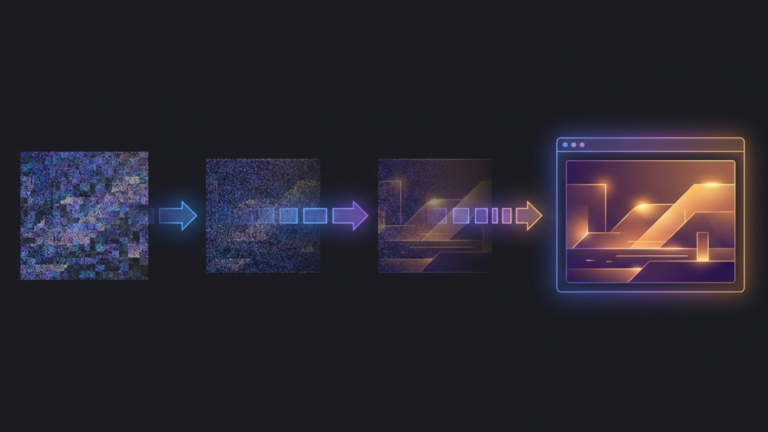
The model does not draw an image from scratch the way a human artist would. It starts with a canvas of pure random noise static, completely meaningless pixel data, and then runs a denoising process that gradually refines that noise into a coherent image matching your description. Each pass through the denoising process removes some of the noise and adds structure guided by your prompt. After twenty to thirty passes, a complete image emerges.
This is why the process is called diffusion. The model was trained by learning to reverse a process of adding noise to real images. It learned what images look like by learning how to recover them from noise. When you give it a prompt, it uses that learned knowledge to guide the denoising toward an image that matches your description.
Three parameters shape how this process runs. The number of sampling steps controls how many denoising passes the model makes. More steps can mean more detail, but with diminishing returns beyond a certain point. The CFG scale controls how strictly the model adheres to your prompt versus exercising its own interpretation. Higher values produce more literal results; lower values give the model more creative latitude. The seed determines the starting state of the random noise. Use the same seed with the same prompt and you get the same image every time, which makes iteration and refinement controllable rather than random.
The Model Ecosystem
The base Stable Diffusion model is a starting point, not a ceiling. The community has built an ecosystem of model variants and add-ons that dramatically expand what the WebUI can produce.
Checkpoints are complete model variants, full replacements for the base model that produce a fundamentally different visual style. A photorealism checkpoint produces images that look like photographs. An anime checkpoint produces images that look like hand-drawn animation. A concept art checkpoint produces images with the loose, painterly quality of professional illustration. Switching between them is a dropdown selection in the interface.
LoRAs Low-Rank Adaptations are lightweight add-ons that teach an existing checkpoint a specific concept without replacing the entire model. A LoRA might teach the model a particular art style, a recurring character design, a clothing aesthetic, or a lighting technique. You apply them on top of a checkpoint and they modify its output in targeted ways. A single checkpoint combined with different LoRAs can produce dramatically different results.
Textual inversions are even smaller files that define a new token the model can recognize in your prompt. They encode a specific concept, style, or subject in a form the model understands, and you invoke them by including that token in your prompt like any other word.
This ecosystem is what makes Stable Diffusion WebUI genuinely extensible rather than just configurable. The community on platforms like CivitAI and Hugging Face has produced thousands of checkpoints, LoRAs, and embeddings covering virtually every visual style imaginable, and most are free.
What It Can Do Beyond Text to Image
Text-to-image generation is the entry point, but the WebUI offers several capabilities that extend well beyond it.
Image-to-image generation lets you upload an existing image and describe how you want it transformed. A rough sketch becomes a finished illustration. A photograph shifts into a different art style. A 3D render gets painterly texture applied to it. The model uses your uploaded image as a structural starting point and rewrites it according to your prompt.
Inpainting lets you mask a specific region of an existing image and regenerate just that area. You can remove an object, fix a detail that generated poorly, or change one element while leaving the rest untouched. Outpainting extends the canvas beyond the original image boundaries, generating new content that blends seamlessly with what was already there.
ControlNet, the most significant extension in the ecosystem, gives you precise control over composition and structure. You can provide a pose skeleton to control how a character is positioned, an edge map to preserve the structure of a logo or object, or a depth map to maintain consistent spatial relationships in a scene. It takes the generation process from probabilistic to deliberate. You control not just what the image depicts but how it is composed.
Why It Belongs in a Homelab
The homelab case for Stable Diffusion WebUI is the same case that runs through this entire series. Ownership of your tools means ownership of your output. Cloud image generation services can change their content policies, raise their prices, or go offline. Your local installation does none of those things.
For practical creative work, generating assets for projects, producing illustrations for content, and experimenting with visual ideas, the unlimited nature of local generation changes how you work. You iterate freely because there is no cost per iteration. You experiment aggressively because there is no usage meter running in the background.
A machine with a capable GPU becomes a 24/7 image generation server accessible to everyone on your network. The same infrastructure serving your media, your AI assistant, and your monitoring tools can serve as a creative studio for your household.
The Takeaway
Stable Diffusion WebUI takes a process that starts with random noise and ends with a coherent image, and makes that process accessible through a visual interface that requires no programming knowledge. The model ecosystem of checkpoints, LoRAs, and embeddings means the visual range of what it can produce is effectively unlimited. And because it runs locally, the creative range of what you can do with it is limited only by your hardware and your imagination, not by someone else’s content policy or pricing tier.









