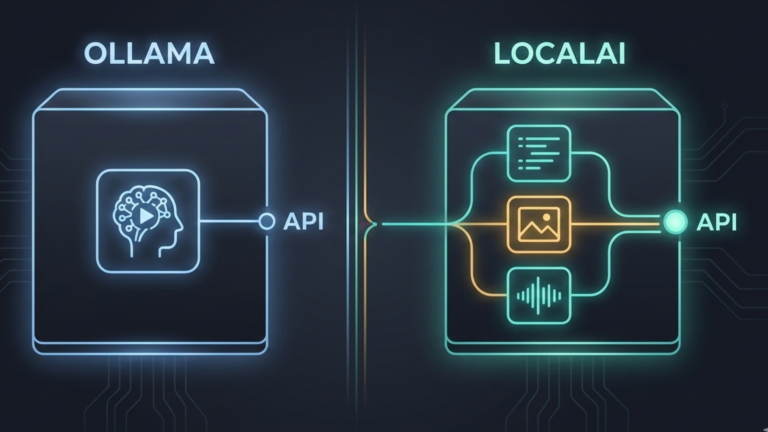
Ollama and LocalAI both run AI models locally on your own hardware. But they are built for different problems, different users, and different stages of a homelab’s growth. Understanding the difference starts with understanding what each tool is actually built to do.
Two Different Architectures
Ollama is built around the command line and the developer experience. Its design philosophy is simplicity: you pull a model, you run it, you get a response. The API it exposes is useful and increasingly compatible with the OpenAI specification, but it is secondary to the core experience of running models quickly and easily on a single machine.
LocalAI is built around the API first. It is designed from the ground up to be a drop-in replacement for the OpenAI API, meaning any application, script, or tool already built to work with OpenAI’s endpoints can point to LocalAI instead with nothing more than a URL change. The API is not an add-on to LocalAI. It is the entire point of it.
This architectural difference explains almost everything else that distinguishes the two tools. Ollama is lightweight because it optimizes for the single-user, single-model, get-something-running-quickly use case. LocalAI carries more overhead because it optimizes for the serve-everything-to-everyone, production-infrastructure use case.
The Multi-Modal Gap
The most concrete difference between the two tools is scope. Ollama handles large language models. That is what it was built for and what it does exceptionally well.
LocalAI handles language models, image generation, and audio text, images, and speech from a single server with a single API. You can run a language model for conversation and document processing, a Stable Diffusion variant for image generation, and Whisper for audio transcription, all through the same endpoint. Applications talk to LocalAI the same way regardless of which modality they are using. The server handles the routing.
For a homelab running Stable Diffusion WebUI, Ollama, and a transcription tool separately, LocalAI represents a consolidation into a single server, a single API, and a single point of management for everything AI-related. Whether that consolidation is worth the added complexity is the real decision.
Hardware and Deployment Philosophy
Ollama is designed to work on whatever hardware you have. It detects whether a GPU is available and uses it, falls back to CPU if not, and requires almost no configuration to get running. You install it, and it works.
LocalAI is also designed to run on consumer hardware, including CPU-only machines, but its deployment model is fundamentally different. It is container-first, built for Docker and Kubernetes rather than native binaries. This fits naturally into a mature homelab where everything already runs as containers, but it adds a layer of complexity for someone just getting started.
LocalAI also supports distributed inference across multiple machines, unlike Ollama. If your homelab spans several physical machines and you want to spread model workloads across them, LocalAI has a path for that. Ollama does not.
When Ollama Is the Right Choice
Ollama remains the better starting point for most homelab users. If you want to run language models locally, experiment with different models quickly, and connect them to interfaces like Open WebUI, Ollama does all of that with minimal friction. Its model library is excellent, its performance is strong, and its resource overhead is low. For personal use and single-user setups, its limitations rarely surface.
The cases where Ollama starts to show its edges are when you need to serve multiple users simultaneously with multiple different models, when you need image or audio capabilities alongside language models through a unified API, or when you are building applications that need a fully OpenAI-compatible server rather than a partially compatible one.
When LocalAI Is the Right Choice
LocalAI earns its place when the homelab has grown past the personal experiment stage into something more like shared infrastructure. When multiple people on a network need AI access across multiple modalities, text, images, and audio through a single consistent endpoint, LocalAI is built for exactly that. When you have existing code or tools written against the OpenAI API and want to run them locally without modification, LocalAI is the right fit. When you are running a CPU-only machine and need multi-modal capability, LocalAI’s CPU optimization matters.
The trade-off is real. LocalAI is more complex to configure, uses more resources for equivalent language model performance, and has a steeper initial learning curve than Ollama. It rewards the investment for the use cases it was built for. It is overkill for simpler ones.
The Takeaway
Ollama and LocalAI are not competing for the same user. Ollama is the right tool when you want local language models running quickly with minimal overhead. LocalAI is the right tool when you want a full OpenAI-compatible server handling multiple AI modalities for multiple users across your network. Ollama is the entry point to local AI in your homelab. LocalAI is what you reach for when that entry point is no longer enough, when the homelab has become infrastructure and needs a tool that was designed for infrastructure from the start.









