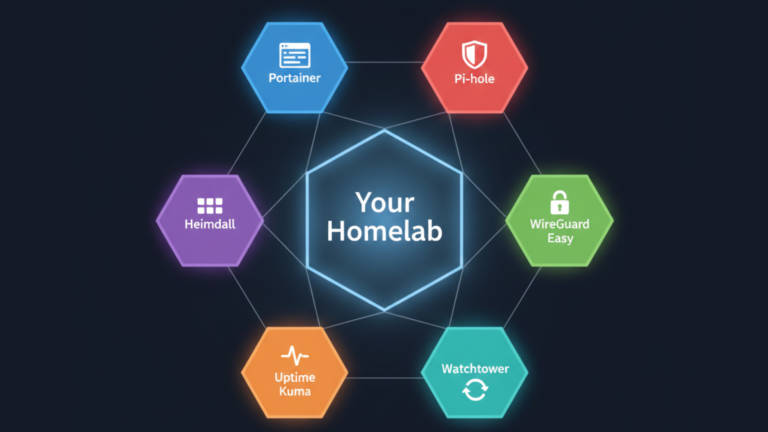
The best Docker containers for homelab are not the most exciting ones available; they are the right ones. These six each address a critical layer of a functional homelab: management, security, organization, access, monitoring, and maintenance. Together they form a complete foundation that scales with you as your setup grows.
The Six Pillars
A well-built homelab needs to be manageable, secure, organized, accessible, monitored, and maintained. Most beginners get one or two of these right and leave the rest to chance. These six containers cover all six, one per layer.
Portainer (Management)
Docker’s command line is powerful but it is not built for visibility. Portainer replaces that friction with a web-based dashboard that shows every container, every volume, every network, and every image in your Docker environment at once. You start, stop, and restart containers with a click. You read logs without memorizing commands. You inspect resource usage without additional tooling.
For a beginner, Portainer does something more important than saving keystrokes: it makes Docker legible. When something breaks, you see it immediately. When you want to experiment, the barrier is low enough that you actually do it. It is the management layer every homelab needs from day one.
Read the full post: What is Portainer and Why Every Homelab Needs It
Pi-hole (Security)
Every device on your network constantly makes DNS requests, the lookups that translate domain names and translate them into IP addresses before any connection is made. Ad servers, tracking networks, and malware domains all depend on these lookups succeeding. Pi-hole intercepts every one of them and blocks the ones that should never resolve in the first place.
The result is network-wide ad and tracker blocking that covers every device automatically, phones, laptops, smart TVs, and game consoles, without installing anything on those devices. It also gives you a live dashboard showing exactly what your devices are doing on the network, which is frequently more revealing than people expect.
Read the full post: What is Pi-hole and How It Blocks Ads for Your Whole Network
Heimdall (Organization)
Every service in a homelab runs on a different port. As the number of services grows, remembering which address corresponds to which tool becomes its own problem. Heimdall solves this with a single customizable dashboard that consolidates every service into one visual interface. One URL, access to everything. No port numbers to remember, no bookmark lists to maintain.
What separates Heimdall from a simple bookmark manager is its Enhanced App support for compatible services, which connects directly to their APIs and displays live status information on the tile itself. Your Pi-hole tile shows queries blocked. Your download manager shows queue status. The dashboard becomes a live view of your homelab rather than just a collection of shortcuts.
Read the full post: What is Heimdall and How to Set Up Your Homelab Dashboard
WireGuard Easy (Access)
The correct way to access a homelab remotely is through a VPN. Opening individual service ports to the public internet exposes them to bots, scanners, and attackers constantly probing for vulnerabilities. A VPN creates a single encrypted entry point; everything else stays private. When you connect, your remote device joins your home network as if it were physically there.
WireGuard Easy packages the WireGuard protocol fast, lean, and cryptographically modern, with a web interface that makes client management simple. Adding a device means clicking a button and scanning a QR code. Revoking access is a single click.
Read the full ingredient post: What is WireGuard Easy and Why Your Homelab Needs a VPN
Uptime Kuma (Monitoring)
Services fail silently. A container crashes at 2 AM, a certificate expires, a volume fills up, and you find out when you try to use something and it does not work. Uptime Kuma checks every service you point it at on a continuous schedule and sends a notification the moment something becomes unreachable. It also monitors SSL certificate expiry dates and alerts you weeks in advance, turning what would be a sudden outage into a routine renewal.
The gap between something breaking and you knowing about it collapses from hours to seconds. You stop being reactive and start being informed.
Read the full post: What is Uptime Kuma and Why Your Homelab Needs Monitoring
Watchtower (Maintenance)
Keeping containers updated is the most important security habit in a homelab and the easiest one to neglect. Manually checking for updates, pulling new images, and restarting containers requires deliberate effort on a regular schedule that most people intend to put in and consistently defer. Watchtower automates the entire process. It runs on a schedule you define, checks every running container for updated images, and applies them automatically using the exact same configuration.
The result is a homelab that stays current without requiring your attention. Known vulnerabilities get patched the day fixes are released rather than whenever you remember to check.
Read the full post: What is Watchtower and How It Keeps Your Containers Updated
How They Work Together
Each of these containers is useful in isolation. Together they cover every layer of a functional homelab without overlap or gaps.
Portainer gives you visibility and control over the environment itself. Pi-hole secures the network layer beneath every service. Heimdall organizes access to everything running above it. WireGuard Easy extends that access securely to wherever you are. Uptime Kuma watches all of it continuously and tells you when something needs attention. Watchtower keeps every layer current without adding to your workload.
Start with the one that solves your most immediate problem and add the others as your homelab grows. By the time all six are running you have not just a collection of containers, you have infrastructure.









